K - Nearest Neighbor is a supervised machine learning algorithm that classifies a new data point into the target class depending on the features of the neighboring data points. The objective of this paper is to demonstrate how the algorithm works using the R programming language. We will use the famous Iris dataset to run the algorithm.
1.1 Data Preparation
We need to do a few tasks first before running the KNN algorithm
Load necessary libraries
Read the data
Perform necessary wrangling tasks
Normalize the data
# load important packagespacman::p_load(tidyverse, class, janitor, viridis, caret)# read datadata("iris")# view first 6 rowshead(iris)
ABCDEFGHIJ0123456789
Sepal.Length
<dbl>
Sepal.Width
<dbl>
Petal.Length
<dbl>
Petal.Width
<dbl>
Species
<fct>
1
5.1
3.5
1.4
0.2
setosa
2
4.9
3.0
1.4
0.2
setosa
3
4.7
3.2
1.3
0.2
setosa
4
4.6
3.1
1.5
0.2
setosa
5
5.0
3.6
1.4
0.2
setosa
6
5.4
3.9
1.7
0.4
setosa
# change column names into more readable namesiris <- iris %>%clean_names()# check names head(iris)
ABCDEFGHIJ0123456789
sepal_length
<dbl>
sepal_width
<dbl>
petal_length
<dbl>
petal_width
<dbl>
species
<fct>
1
5.1
3.5
1.4
0.2
setosa
2
4.9
3.0
1.4
0.2
setosa
3
4.7
3.2
1.3
0.2
setosa
4
4.6
3.1
1.5
0.2
setosa
5
5.0
3.6
1.4
0.2
setosa
6
5.4
3.9
1.7
0.4
setosa
Note that the variable species is our target variable.
# define a min-max normalize() function# This function rescales a vector x such that its minimum value is zero and its maximum# value is one; It does this by subtracting the minimum value from each value of x and# dividing by the range of values of x.normalize <-function(x){return((x -min(x)) / (max(x) -min(x)))}# apply normalization to the first 4 columns iris[, 1:4] <-normalize(iris[, 1:4])head(iris)
ABCDEFGHIJ0123456789
sepal_length
<dbl>
sepal_width
<dbl>
petal_length
<dbl>
petal_width
<dbl>
species
<fct>
1
0.6410256
0.4358974
0.1666667
0.01282051
setosa
2
0.6153846
0.3717949
0.1666667
0.01282051
setosa
3
0.5897436
0.3974359
0.1538462
0.01282051
setosa
4
0.5769231
0.3846154
0.1794872
0.01282051
setosa
5
0.6282051
0.4487179
0.1666667
0.01282051
setosa
6
0.6794872
0.4871795
0.2051282
0.03846154
setosa
1.2 Data Splicing
We need to split the data into training and testing sets. We will use the training set to train the KNN algorithm and testing set to test the performance of the model. Lets use 80% of the data for training and the rest for testing.
# create a row id for each rowiris <- iris %>%rowid_to_column()# set seed for reproducible sampling set.seed(13745)# split the data into training and testing sets# apply the 80/20 splitting ruletraining_set <- iris %>%slice_sample(prop =0.8)# testing settesting_set <- iris %>%anti_join(training_set, by ="rowid")
1.3 Label creation and k value
k in general should be an odd number since the algorithm might confuse even number of classes.
# Assign row labelsspecies_type <- training_set$species# Assign k to the rounded square root of the no. of observations in the training setk_value <-round(sqrt(nrow(training_set)))# print k_valuek_value
[1] 11
2 Model fitting
The knn() function from the class package is used to run the KNN algorithm.
predictions <-knn(# set train to training_set without rowid and species categoriestrain = training_set %>%select(-c(rowid, species)),# set test to testing_set without rowid and species categoriestest = testing_set %>%select(-c(rowid, species)),# set class to training_set labelscl = species_type,# use the earlier define k_value as kk = k_value)head(predictions)
Lets add the predictions to our testing_set as follows
# define plotting dataplotting_data <- testing_set %>%# rename species variable to actual_speciesrename(actual_species = species) %>%# add knn predictions as a variable as predicted_speciesmutate(predicted_species = predictions)
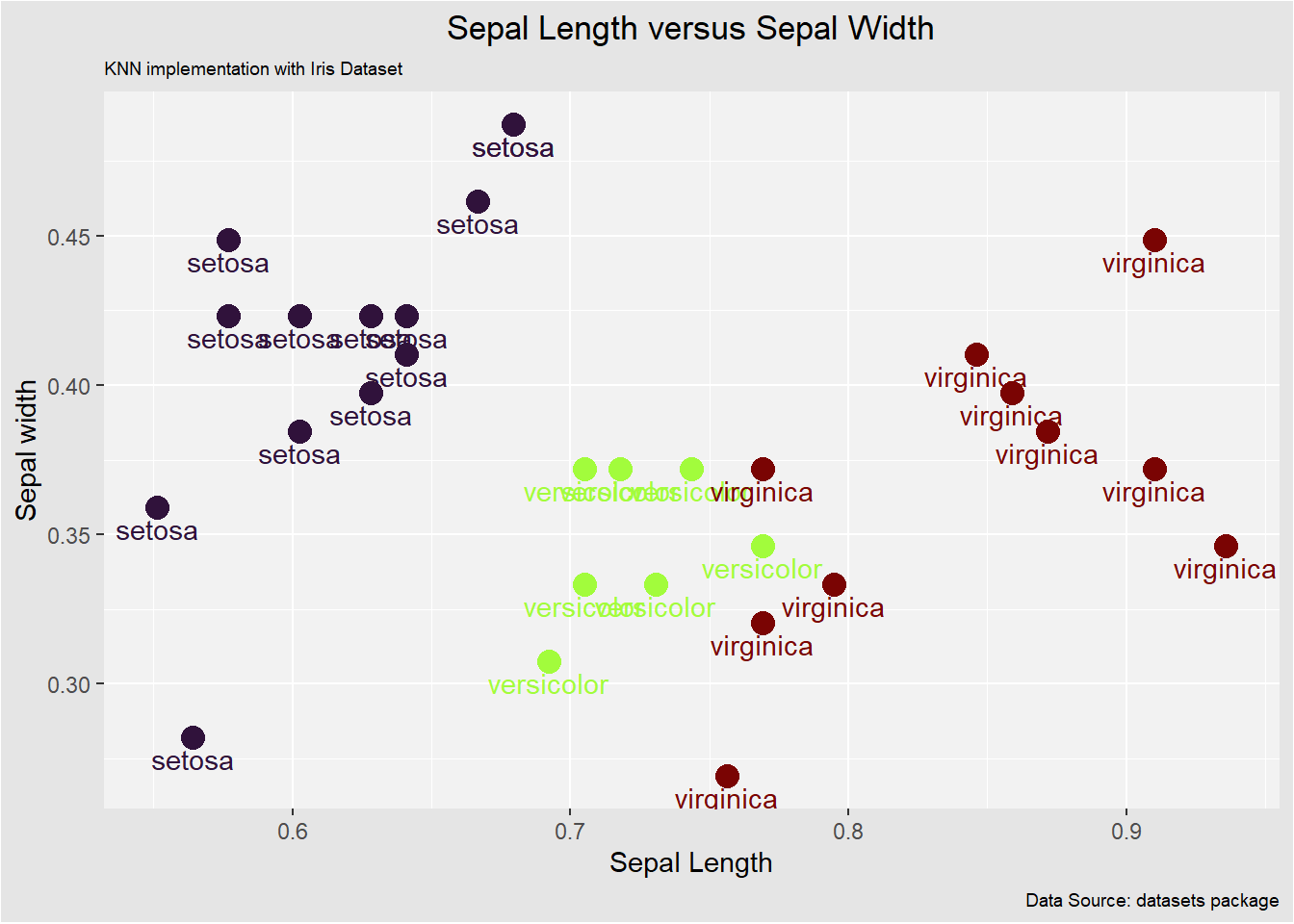
we can utilize a scatter plot to visualize the relationship between sepal length and sepal width as follows
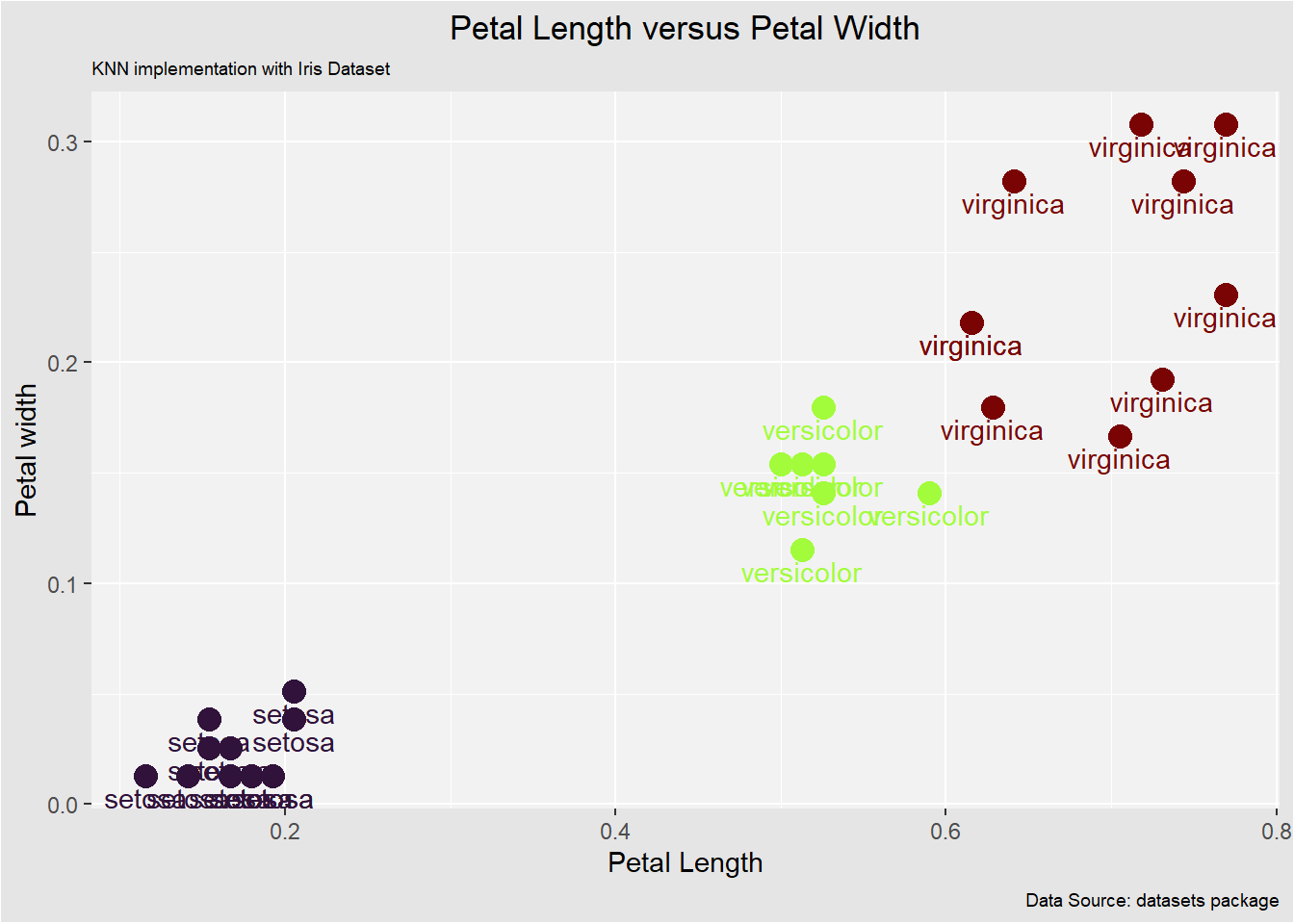
In this case, the algorithm does well in classifying each data point to the target class.
4 Model Accuracy
After building the model, it is time to evaluate its accuracy. We will use the confusionMatrix() function from the caret package to generate the confusion matrix and calculate statistics.
# generate confusion matrix and model statistics
confusionMatrix(table(predictions, testing_set$species))
Confusion Matrix and Statistics


predictions  setosa versicolor virginica
  setosa         13          0         0
  versicolor      0          7         0
  virginica       0          0        10

Overall Statistics

               Accuracy : 1
                 95% CI : (0.8843, 1)
    No Information Rate : 0.4333
    P-Value [Acc > NIR] : 1.273e-11

                  Kappa : 1

 Mcnemar's Test P-Value : NA

Statistics by Class:

                     Class: setosa Class: versicolor Class: virginica
Sensitivity                 1.0000            1.0000           1.0000
Specificity                 1.0000            1.0000           1.0000
Pos Pred Value              1.0000            1.0000           1.0000
Neg Pred Value              1.0000            1.0000           1.0000
Prevalence                  0.4333            0.2333           0.3333
Detection Rate              0.4333            0.2333           0.3333
Detection Prevalence        0.4333            0.2333           0.3333
Balanced Accuracy           1.0000            1.0000           1.0000
# put the results into tidy formatconfusionMatrix(table(predictions, testing_set$species)) %>% broom::tidy()
ABCDEFGHIJ0123456789
term
<chr>
class
<chr>
estimate
<dbl>
conf.low
<dbl>
conf.high
<dbl>
accuracy
NA
1.0000000
0.8842967
1
kappa
NA
1.0000000
NA
NA
mcnemar
NA
NA
NA
NA
sensitivity
setosa
1.0000000
NA
NA
specificity
setosa
1.0000000
NA
NA
pos_pred_value
setosa
1.0000000
NA
NA
neg_pred_value
setosa
1.0000000
NA
NA
precision
setosa
1.0000000
NA
NA
recall
setosa
1.0000000
NA
NA
f1
setosa
1.0000000
NA
NA
So, from the output, we can see that our model predicts the outcome with an accuracy of 86.67% which is good since we worked with a small data set. A point to remember is that the more data (optimal data) we feed the machine, the more efficient the model will be.